About 20 million Germans regularly experience problems with and around the spine. This makes back pain the number one widespread ailment and the second most common reason why employees take sick leave. Of course, the causes are varied, and psychological factors may also play a role. The physical causes can be minimized with a few tips. After all, sitting in particular is by no means as low-impact as many people think.
The cost of lost workdays runs into the billions
A major cause of back pain is the repetitive strain on the musculoskeletal system caused by prolonged sitting. More specifically, on average, an employee spends 80 percent of their workday in an office chair—and almost entirely motionless. The following approach is recommended:
- 60 percent dynamic sitting (changing positions)
- 30 percent standing
- 10 percent walking around
With height-adjustable desks that can be adjusted at the push of a button, many tasks can be performed while standing. While these desks are more expensive than conventional models, However, occupational safety is not a luxury but a prerequisite for healthy, motivated, and productive employees. Employers should therefore recognize the value of such an investment. According to a survey by the German federal government, production losses due to musculoskeletal disorders cost 18.5 billion euros in 2018.
Employers Legally Required to Conduct Risk Assessments
Incidentally, employees can insist that a risk assessment be conducted at their workplace. Employers are legally obligated to do so. The works council has extensive co-determination rights in this regard, which enable it to enforce a corresponding company agreement. It is likely that many companies do not intentionally neglect their duty of care and will take action once problems are brought to their attention.
When working while seated, two points deserve special attention: ergonomic work design and sitting posture and movement during the workday. Anyone reading this article and taking these tips to heart has already taken the first step. Of course, it’s now important to permanently integrate these tips into your daily work routine.
Furthermore, according to the Workplace Ordinance (Appendix 6.1.2), employers must ensure that work at computer screens is interrupted by other activities or regular breaks.
Individual Adjustment of Workstation Elements Is Important
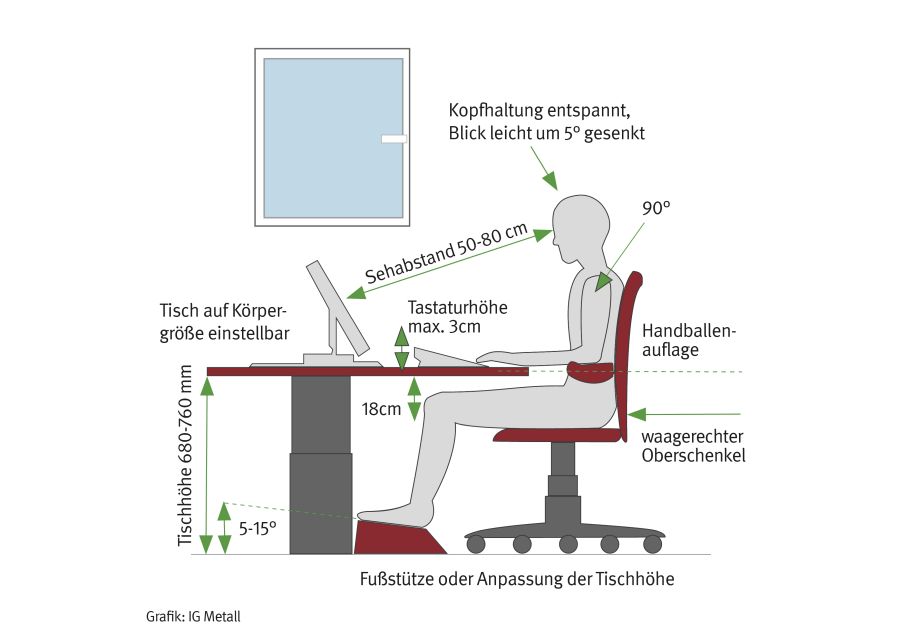
When it comes to the ergonomic design of the workplace, it all comes down to having the right furniture at the right distances. It is important that the equipment is adapted to each individual employee. But the work tasks themselves should also be tailored to promote an active daily routine. For example, simply having the printer located in a separate room in a central location on the floor—rather than right next to the desk—can significantly increase movement during the workday. Many companies have in-house specialists who can assist with this, or employers may hire external experts to visit the offices. Customizing workstation elements helps prevent issues such as postural problems and muscle tension. The result should look something like this:
- Upright sitting posture
- Slightly downward gaze toward the tilted screen
- Line of sight to the screen should be as parallel to the window as possible
- Arms at a right angle, preferably resting on armrests
- Palms in front of the keyboard
- Legs have freedom of movement
You should slightly adjust your sitting position or posture about every 15 minutes: “Dynamic sitting” means alternating between leaning back, leaning forward, and sitting upright—which, among other things, is good for your spinal discs. After all, there’s no single sitting position that you can maintain comfortably for long periods without experiencing discomfort.
Don’t always call—walk over to the next cubicle
In addition, you can use long program loading times, for example, to get a glass of water. Your coworkers will surely appreciate it when someone stops by instead of always just calling. In the past, for instance, files were passed from office to office; in the digital age, often only your fingers move across the keyboard. In some offices, this is intentional. With the “Lean Office” trend, work processes are streamlined, seemingly unnecessary steps are eliminated, and work equipment is arranged according to the “principle of short distances.” While this may seem efficient at first glance, it is not healthy for employees.
Ergonomically designed furniture equipped with the appropriate technology is essential for maintaining proper posture. As mentioned earlier, this includes height-adjustable desks that allow employees to work while sitting or standing; office chairs that adjust in height, backrest, and seat to fit the individual and follow the body’s movements; and large, height-adjustable monitors. The health and productivity of employees are well worth such equipment. Our flyer“Ergonomic Computer Work”summarizes the most important tips.
“Ergonomic Computer Work” (PDF, 2 pages)